Two adapters made this list:
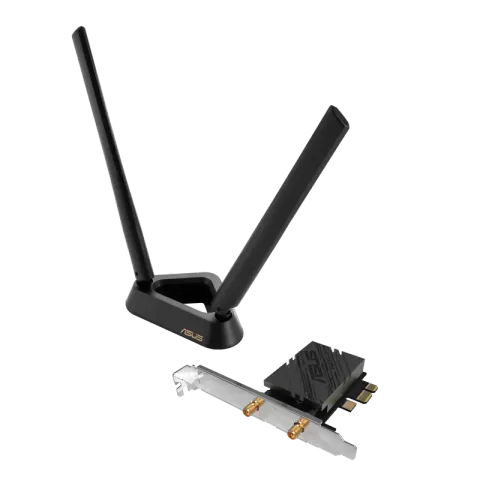
- ASUS PCE-BE92BT for Windows 11 desktops with an Intel 13th-gen or newer CPU and a free PCIe slot. It has the higher 6 GHz rating of the two.
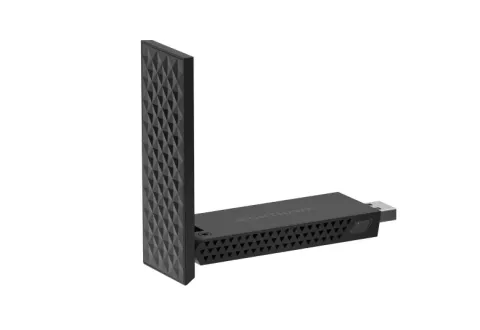
- NETGEAR A9000 for any Windows 11 PC. It’s a USB adapter, so there’s no case to open, and NETGEAR lists no CPU restriction.
We haven’t tested these adapters ourselves. We picked them from the manufacturers’ specifications against the criteria below.
Before you buy: three requirements
Microsoft says Wi-Fi 7 is available starting with Windows 11 version 24H2. It needs a Wi-Fi 7 router and a Wi-Fi 7 adapter that both support WPA3, plus the latest Windows updates. If any of the three is missing, a Wi-Fi 7 adapter falls back to an older standard. NETGEAR, for example, says the A9000 works with any router but needs a Wi-Fi 7 router to reach Wi-Fi 7 speeds and features.
If your router is older, upgrading the router does more for every device in the house. See Wi-Fi 6E vs Wi-Fi 7 for whether that’s worth it and the best Wi-Fi routers for picks.
The criteria that decide it
- How it connects. A PCIe card goes inside a desktop and needs a free slot. A USB adapter works with laptops and desktops alike.
- Platform restrictions. ASUS says the PCE-BE92BT is compatible with Intel 13th-generation and later CPUs, only with Intel motherboards, and doesn’t support all AMD motherboards. Check this before anything else if you have an AMD system.
- The 6 GHz rating. The 6 GHz band is where Wi-Fi 7’s widest channels live; Wi-Fi 7 explained covers how they work. The two picks differ most here.
How the two compare
ASUS lists the PCE-BE92BT as a BE9400 PCIe x1 card. It’s rated up to 5,764 Mbps on 6 GHz, 2,882 Mbps on 5 GHz and 688 Mbps on 2.4 GHz, with Bluetooth 5.4 and two external antennas on a base. It supports Windows 11 64-bit. The antenna base sits on the desk, so the antennas don’t have to stay behind the PC’s metal case.
NETGEAR lists the A9000 as a BE6500 tri-band USB 3.0 adapter. It’s rated up to 688 Mbps on 2.4 GHz and 2,882 Mbps on both 5 and 6 GHz, with two streams on each band. It comes with a cradle, also works on USB 2.0, and supports Windows 11 only.
These are maximum link rates, not the speeds you’ll see. Real throughput depends on distance, walls, the router and what else is on the network. Before buying an adapter for a laptop, check its specifications: it may already have Wi-Fi 7. Intel, for example, makes two-stream Wi-Fi 7 adapters for laptops, rated up to 5.8 Gbps with 320 MHz channels and 4096-QAM.
Check it’s working
Once the adapter is installed, Microsoft suggests two checks. netsh wlan show drivers should list 802.11be among the supported radio types. If the network’s Wi-Fi properties show more than one band (for example 5 GHz and 6 GHz), Multi-Link Operation is in use. If you only see 2.4 or 5 GHz, see Wi-Fi bands explained.
Why this list is short
We only include adapters whose specifications and requirements we could confirm on the manufacturer’s own pages. Two met that bar when this page was written; we’ll add others, including more AMD-friendly PCIe cards, as they’re verified. Prices aren’t listed because they change constantly. Each “Check price on Amazon” button opens an Amazon search for that exact model.