Short answer: if you use gFiber’s router, ask gFiber for its Wi-Fi 7 Mesh Extender before buying anything. It’s designed to work with gFiber’s router, and gFiber doesn’t charge a monthly fee for it. Buy your own mesh system only if you’ve replaced gFiber’s router with your own, and then match the system’s internet port to your plan.
We haven’t tested any of this equipment ourselves. This guide is based on gFiber’s own documentation and the manufacturers’ specifications.
What gFiber already gives you
As of August 2026, gFiber says it includes up to two mesh extenders when a home’s layout needs them, for up to 5,000 sq ft of coverage, and that it never charges a monthly fee for equipment. The router depends on your plan: Core 1 Gig comes with a Wi-Fi 6E router, while Home 3 Gig and Edge 8 Gig come with a Wi-Fi 7 router. Plans and included equipment change, so check what your plan includes today.
gFiber’s Wi-Fi 7 Router has a 10 Gbps internet (WAN) port, a 10 Gbps LAN port and three 2.5 Gbps LAN ports. It has 2.4, 5 and 6 GHz radios, and Multi-Link Operation (MLO) across 5 and 6 GHz. gFiber recommends adding a mesh extender in homes over 2,000 sq ft or with weak areas. The router is separate from the Fiber Jack, the small box where the fiber line enters your home.
Why start here? The extender is made to pair with gFiber’s router, its link back to the router uses Wi-Fi 7 with MLO, and it costs nothing extra each month. A generic plug-in extender works differently from a mesh unit; Mesh Wi-Fi vs router vs extender explains the trade-offs.
Where to put the gFiber extender
gFiber’s setup steps are:
- Set the extender up within about 5 ft of the router.
Once it’s paired, move it to its final spot, ideally halfway between the router and the devices with weak Wi-Fi.
- Keep a clear line of sight to the router where you can.
MLO is switched on automatically for the link between the extender and the router. You can also connect the extender to the router with an Ethernet cable, which is the most reliable option if your home already has cabling. For why a wired link helps, see mesh backhaul explained.
The halfway rule matters. An extender placed in the dead zone itself has a weak link back to the router, so everything connected to it is slow too. If a room is still weak after placement, how to fix Wi-Fi dead zones covers the other causes.
When buying your own makes sense
You can use your own router with gFiber by plugging its WAN port into the Fiber Jack’s Ethernet port. gFiber recommends a 1 Gbps WAN port for 1 Gig plans and a 10 Gbps WAN port for its multi-gig plans. gFiber also says it doesn’t support configuring third-party routers, so setup and troubleshooting are up to you.
If you go this way, two things are worth knowing:
- Replace gFiber’s router rather than adding to it. Connect your own mesh system directly to the Fiber Jack. Putting it behind gFiber’s router creates two routers in a row; see double NAT explained.
- Check the internet port against your plan. Both mesh systems below have 2.5 Gbps internet ports.
Own-equipment picks
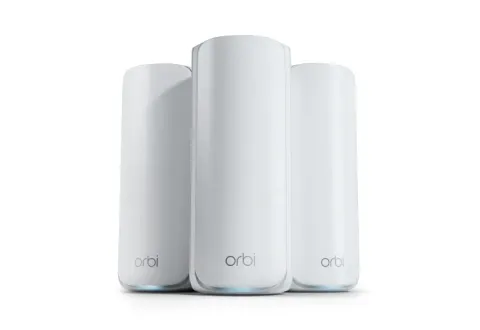
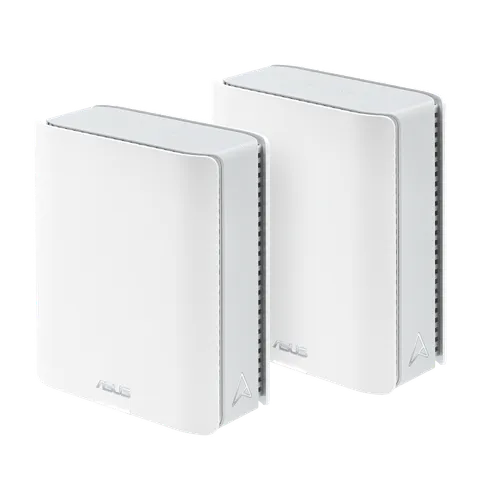
| NETGEAR Orbi 770 | ASUS ZenWiFi BT8 | |
|---|---|---|
| Wi-Fi | Wi-Fi 7 tri-band, BE11000 | Wi-Fi 7 tri-band, BE14000 |
| Internet port | 2.5 Gbps | 2.5 Gbps |
| Ports on satellites | Two 2.5 Gbps | One 2.5 Gbps WAN, one 2.5 Gbps LAN, two 1 Gbps |
| Wired backhaul | 2.5 Gbps option | Via the 2.5 Gbps ports |
| Packs | 3-pack (this listing) | 1-, 2- and 3-packs |
| Coverage claim | Up to 8,000 sq ft (3-pack) | None published |
| Best gFiber fit | 1 Gig plan, large or multi-floor | 1 Gig plan, room to start small and add units |
The specifications and NETGEAR’s coverage claim come from NETGEAR’s Orbi 770 page and ASUS’s ZenWiFi BT8 specifications. Coverage figures are the manufacturer’s claim under its own assumptions, not a measurement of your home.
Both product lines held an FCC Conditional Approval as of the FCC’s notice of 9 September 2026: NETGEAR’s Orbi consumer mesh systems to 1 October 2027, and ASUS’s ZenWiFi mesh series to 6 March 2028. See the FCC router rule explained.
For the full criteria behind these two systems, see the best mesh Wi-Fi systems. Prices aren’t listed because they change constantly; each system’s “Check price on Amazon” button opens its Amazon listing (the BT8 button opens the 2-pack).